How South African SMEs Can Automate Customer Enquiries with WhatsApp and AI starts with a simple idea: let technology handle repeatable questions, while people handle decisions, exceptions, and sensitive customer needs. A well designed WhatsApp workflow can capture enquiries after hours, give approved answers faster, and ensure staff receive the context needed to continue the conversation.
Key Takeaways
• Use the WhatsApp Business app for low volume, manual conversations and basic replies. Use the WhatsApp Business Platform for routing, integrations, and scalable automation.
• Automate repeatable tasks first: business hours, service details, lead capture, booking requests, and follow ups.
• Keep AI grounded in approved information. Do not allow it to invent prices, stock levels, policies, or availability.
• Build a clear handoff path so customers can reach a person without repeating their story.
• Treat POPIA, opt in records, data access, retention, and deletion requests as workflow requirements, not paperwork to address later.
Choose The Right WhatsApp And AI Setup
The right setup depends less on hype and more on enquiry volume, staff capacity, the complexity of customer questions, and the systems the business already uses. We should not assume that every SME needs a fully conversational AI agent. For a small salon receiving a manageable number of messages each day, a simple menu and manual replies may be more useful than a complex integration. For a property agency handling enquiries across several agents, automated qualification and routing can prevent leads from sitting unanswered.
Understand The Core Options
The WhatsApp Business app is designed for direct, mostly manual customer communication. It can support a business profile, greeting messages, away messages, quick replies, labels, and a product catalog. It suits an owner operated business or a small team where staff can reasonably monitor chats.
The WhatsApp Business Platform, often called the API, connects WhatsApp to approved business software. It can support automation, multiple users, routing rules, CRM records, calendar checks, templates, webhooks, and reporting. A commercial guide from BizAI’s WhatsApp Business overview distinguishes manual app based use from API based automation and advertises responses in English, Afrikaans, and isiZulu. Language support should still be tested with real business terms before relying on it.
A rule based chatbot follows fixed choices and conditions. For example, a customer selects “Book an appointment,” chooses a service, and receives available times. It is predictable and easier to control.
A generative AI agent interprets open ended questions and drafts a natural response from approved information. It can be useful when customers ask the same question in many ways, such as “Do you repair burst geysers in Grahamstown?” or “Can I get a quote for two rooms?” Its value depends on the quality and freshness of the information behind it.
| Business Need | Suitable Starting Point | When To Avoid It |
|---|---|---|
| Low message volume and one owner responding | WhatsApp Business app with quick replies | If messages are missed or multiple staff need access |
| Repeated predictable questions | Rule based menu chatbot | If customers often ask detailed, varied questions |
| Lead qualification and team routing | WhatsApp Business Platform with CRM integration | If there is no agreed sales process to receive leads |
| Complex natural language questions | Grounded AI agent with human handoff | If prices, inventory, or policies are not maintained |
| Appointment availability | Calendar connected workflow | If staff still manage bookings only on paper or by memory |
Use A Practical Decision Framework
A useful choice can be made with five questions:
-
How many enquiries are missed or delayed each week? If delays occur only occasionally, improve staff ownership before buying advanced software. If messages regularly wait overnight or fall between team members, routing and automation become more valuable.
-
Are the same questions repeated? Questions about operating hours, service areas, requirements, and appointment availability are good early automation candidates.
-
Does the answer change often? AI should not answer from an old price list. If stock and prices change daily, connect the workflow to a reliable source or route those questions to a person.
-
What must happen after the chat? A lead that stays inside WhatsApp can be forgotten. If the business needs a quote, booking, invoice, or sales task, it needs a clear destination such as a CRM, calendar, email inbox, or spreadsheet.
-
Who owns the handoff? Automation without a named person or queue simply moves the delay to another place.
For SMEs that need broader setup support, reviewing available services offered can help clarify whether the requirement is a simple workflow, an integration, or a custom system.
Budget For The Whole Workflow
Monthly software cost is only one part of the decision. Businesses should account for setup, approved message templates, AI use, integrations, staff training, and ongoing content maintenance. A BossBot practical guide gives an indicative commercial estimate of roughly R500 to R2,000 per month for Business Solution Provider software and Meta message pass through costs for a typical South African SMME. This is not a market wide benchmark, so request a written breakdown from each provider.
A simple cost model looks like this:
| Cost Area | Questions To Ask |
|---|---|
| Platform or BSP subscription | Is pricing per number, user, conversation, or feature? |
| Meta messaging charges | Which conversations or templates may create pass through charges? |
| AI usage | Is there a limit on messages, documents, or generated answers? |
| Implementation | Does setup include templates, routing, integrations, and testing? |
| Maintenance | Who updates prices, FAQs, business hours, and escalation rules? |
| Human support | Will staff need a shared inbox, sales queue, or after hours roster? |
Build Customer Enquiry Workflows That Actually Help
The best WhatsApp automation is not a wall of text. It is a short path that helps a customer reach an answer, complete an action, or speak to the right person. Start with one high volume workflow and define what a successful outcome looks like.
Answer FAQs Without Overpromising
Use automation for stable answers that have an approved source. A retailer can answer store hours, delivery areas, return steps, and product categories. A plumbing business can explain call out areas and request photos. A legal or financial services firm should be much more cautious: it can collect an enquiry and explain how to book, but should not offer personalized advice through an automated reply.
A safer AI design uses retrieval grounded generation. In plain terms, the AI looks up relevant answers in a controlled knowledge base before replying. That knowledge base might contain a current price sheet, service catalog, terms, and approved FAQs.
Create An Answer Approval System
For every source document, assign:
• An owner responsible for accuracy
• A review date
• A status showing whether the content is active or outdated
• Rules for answers that require human confirmation
For example, an AI agent can say, “Our standard installation packages start from the listed rates. A team member will confirm the final quote after reviewing your requirements.” It should not state a final amount if the job depends on site conditions.
Capture And Qualify Leads With Less Friction
A lead workflow should ask only for information that changes the next action. Too many questions make customers abandon the conversation. For a solar installer, that may be suburb, property type, electricity issue, and preferred contact time. For an estate agency, it may be area, budget range, buying or renting, and move date.
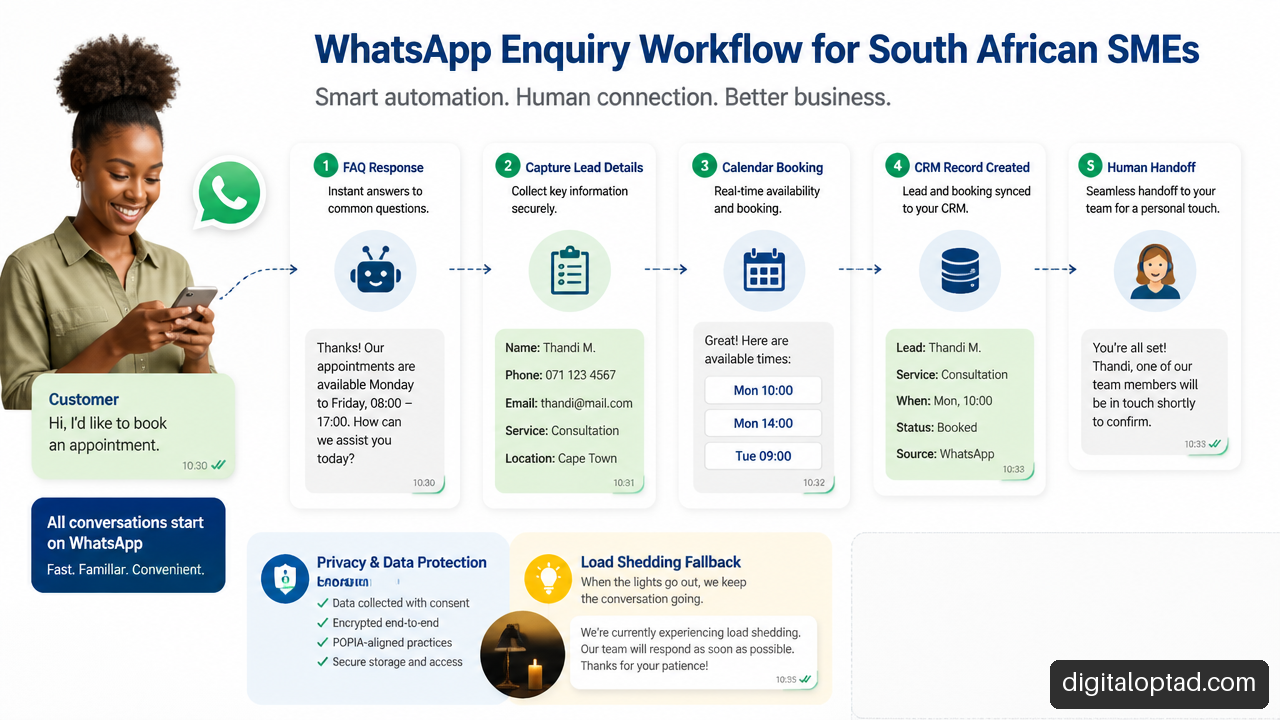
We Own Leads describes an AI qualification pattern that collects fields such as budget, service type, timeline, and location before passing the conversation context to staff. The useful principle is not the exact field list. It is that a staff member should receive a readable summary rather than an unexplained “new lead” notification.
A handoff summary could include:
Customer: Thandi M.
Request: Two bedroom rental in Makhanda
Budget: Up to R8,000 per month
Move Date: December
Preferred Contact: WhatsApp after 17:00
Customer Question: Are pets allowed?
That summary should be written back to the CRM or assigned inbox with an owner and due time.
Handle Bookings, Quotations, And Follow Ups
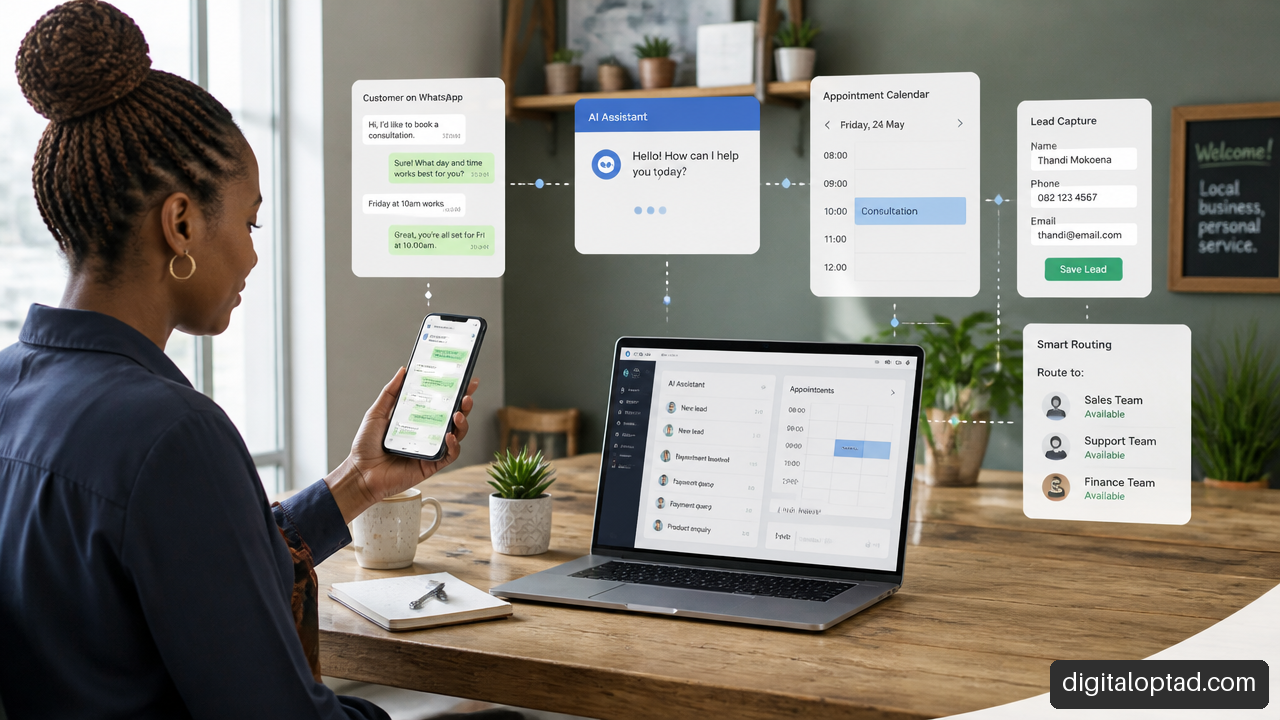
Booking automation works best when the calendar is the source of truth. The chatbot should check available slots, reserve a time, record customer details, and send a confirmation. If the system cannot confirm availability in real time, it should collect a preferred slot and clearly state that the booking is pending.
Consider a beauty salon. A customer asks for a Saturday appointment. The workflow can offer services, request a preferred stylist, show only free slots, and send a reminder. If a customer asks for a service combination that needs extra time, the system should send the chat to staff instead of guessing.
Some providers market these combined capabilities. For example, SmartChat & Echo’s AI WhatsApp offering advertises answering questions, booking appointments, and following up with customers on WhatsApp and the web. Businesses should validate how the workflow handles exceptions, calendar changes, and handoffs before committing.
Online services can also be relevant where customer messaging needs to connect with websites, forms, hosting, email, or business operations beyond WhatsApp.
Protect Privacy, Accuracy, And Human Service
Automation can create a faster front door, but it should not become a barrier between the customer and a helpful person. Three risks deserve attention from the start: personal data, incorrect answers, and broken handoffs.
Map Customer Data Before Collecting It
POPIA applies when a business processes personal information. A WhatsApp enquiry may contain names, phone numbers, addresses, appointment details, property information, identity documents, or health related details. The appropriate approach depends on the business and its processing activities, so businesses should seek suitable legal or compliance guidance where needed.
At minimum, map the journey:
| Data Item | Why It Is Collected | Who Can Access It | Retention Decision |
|---|---|---|---|
| Name and phone number | Responding to the enquiry | Customer service and sales staff | Keep only as long as needed for the relationship or recordkeeping purpose |
| Location or suburb | Checking service area or assigning branch | Relevant branch or operations team | Remove if no longer needed |
| Booking details | Scheduling and reminders | Booking staff | Retain under documented booking rules |
| Sensitive information | Only where necessary and appropriate | Restricted authorized staff | Minimize collection and restrict access |
Tell customers what information is being collected and why. Avoid asking for bank card details, identity documents, medical details, or other sensitive information through a general chatbot unless there is a carefully designed, secure process and a clear lawful basis. Do not use customer conversation data to train a general AI model without clear governance and an appropriate legal review.
Prevent Wrong Prices And Unsupported Claims
A common failure mode is an AI answer based on an outdated document. Another is a customer asking, “Is this in stock today?” when the bot only knows the product catalog from last month.
Build explicit rules:
• Give fixed prices only when the price source is current and controlled.
• Give ranges when a quote depends on inspection, measurements, or options.
• Confirm live availability through an inventory system, or say that a staff member will check.
• Escalate complaints, refunds, payment disputes, safety issues, and legal or medical questions immediately.
• Log corrections so the knowledge base improves instead of repeating the same mistake.
A digital AI agent may be useful where businesses need structured AI driven customer interactions, but the technology should remain limited by approved rules, data, and escalation paths.
Design A Human Handoff That Preserves Trust
A customer should be able to type “agent,” “human,” or a similar instruction at any point. The system should also automatically escalate when it has low confidence, detects frustration, receives a complaint, or encounters a request outside its approved scope.
A strong handoff includes:
-
The reason for escalation, such as “pricing exception” or “urgent repair.”
-
A conversation summary and captured fields.
-
A named owner, team queue, or branch.
-
A response target, even if it is only “within the next business day.”
-
A fallback message if no staff member is available.
During load shedding or connectivity disruptions, the workflow should not promise an immediate human reply it cannot deliver. BossBot’s outage aware workflow example proposes acknowledging the interruption, capturing the enquiry, and stating an expected response time. That is a sensible pattern to test, especially for businesses dependent on a single internet connection or on site staff.
Implement, Test, And Measure The System
A careful rollout reduces risk. Build one useful workflow, test it with realistic messages, then expand only after staff can manage the outcomes.
Follow A Simple Implementation Checklist
-
List the ten to twenty most common enquiry types from recent WhatsApp conversations.
-
Mark each one as: answer automatically, collect details, check a system, or hand to a person.
-
Create approved source content for prices, policies, service areas, business hours, and booking rules.
-
Define opt in and template processes for outbound reminders, follow ups, and promotions. Verify current Meta requirements with the chosen provider before launch.
-
Connect only the systems that have a clear purpose, such as a calendar for appointments or CRM for qualified leads.
-
Write handoff triggers and assign staff ownership for each queue.
-
Test in English, Afrikaans, isiZulu, and mixed language messages if those reflect customer communication.
-
Launch with a limited customer journey, review conversations weekly, and correct gaps.
Test Language And Code Switching Properly
A multilingual label is not proof of quality. Test actual messages customers may send, including abbreviations, local place names, spelling mistakes, voice note transcripts, and code switching such as, “Sawubona, do you have a slot for a haircut môre?”
Create a scorecard for each test:
| Test Area | What Good Looks Like | Escalate When |
|---|---|---|
| Intent recognition | Correctly identifies the request | The question is ambiguous |
| Local terms and names | Does not distort names or locations | Meaning could change a booking or quote |
| Tone | Respectful and clear | The customer appears confused or frustrated |
| Translation | Preserves the business meaning | A policy, price, or safety instruction may be misunderstood |
| Code switching | Responds in a clear preferred language | The system mixes languages poorly |
There is limited independent evidence on accuracy for South African multilingual and code switched WhatsApp conversations. Treat language testing as an operational requirement, not a feature checkbox.
Track Quality, Not Just Fast Replies
Instant replies can look impressive while still creating more work for staff. Measure whether the automation resolves appropriate conversations and routes the rest correctly.
Useful indicators include:
• First response time: How quickly the customer receives an acknowledgement.
• Containment rate: The share of suitable conversations completed without human help.
• Escalation accuracy: Whether conversations were transferred when they should have been.
• Booking completion rate: The share of booking requests that become confirmed appointments.
• Correction rate: How often staff must fix an automated answer.
• Lead follow up completion: Whether qualified leads receive the promised human response.
• Opt out or complaint signals: Whether customers feel the messages are unwanted or unhelpful.
The target is not maximum containment. A customer with a complaint, unusual quote, or urgent service request should reach a person quickly. That is often a better outcome than forcing the conversation through automation.
Frequently Asked Questions
What Is The Difference Between WhatsApp Business And The WhatsApp Business Platform?
The WhatsApp Business app supports manual messaging and basic business tools. The WhatsApp Business Platform supports integrations, automation, multiple team members, routing, templates, and more structured workflows. Choose the app when staff can handle messages directly. Choose the Platform when volume, handoffs, or system connections make manual management unreliable.
Can A South African SME Use AI On WhatsApp Without Building Custom Software?
Yes. Some Business Solution Providers and automation platforms offer configured workflows, shared inboxes, chatbots, and AI features without requiring a business to build the technology from scratch. The tradeoff is flexibility. A no code setup may be enough for FAQs and lead capture, while complex quoting, inventory, or custom approvals may need tailored integration.
Which Enquiries Should We Automate First?
Begin with frequent, low risk questions that have stable answers: operating hours, service areas, appointment requests, required documents, delivery information, and basic product categories. Avoid automating final quotes, live stock promises, disputes, legal guidance, medical information, or sensitive account questions until controls are in place.
Can AI Answer Questions About Prices, Products, Availability, And Bookings?
It can, but each answer needs the right data source. Fixed package prices can come from an approved price list. Availability should come from a live inventory or calendar system where possible. If the data is uncertain, the AI should explain that confirmation is needed and route the conversation to staff.
How Can Customers Reach A Human During An Automated Chat?
Provide a clear “talk to a person” option and recognize common requests such as “agent,” “human,” or “call me.” Also set automatic escalation for complaints, repeated failed answers, urgent issues, low confidence responses, and requests involving sensitive personal information.
Can WhatsApp AI Understand Afrikaans, IsiZulu, And Mixed Language Messages?
Some platforms advertise multilingual support, but performance can vary by language, business vocabulary, spelling, and code switching. Test representative customer messages before launch. If the system is unsure, it should ask a short clarifying question or transfer the conversation rather than guess.
Is It Legal To Store Customer WhatsApp Conversations Under POPIA?
Businesses can process personal information only with appropriate safeguards and a valid purpose. They should collect the minimum information needed, control access, define retention periods, protect records, and have a process for customer requests. Because obligations depend on the business context, sensitive data, and processing purpose, legal or privacy advice may be appropriate.
How Do We Know Whether Automation Is Helping?
Review a sample of conversations each week. Check whether customers got correct answers, whether leads reached staff, whether bookings were completed, and whether customers had to repeat themselves. A lower correction rate and more reliable follow up can matter more than a higher number of automated replies.
Sources And References
• BossBot — WhatsApp Automation for South African Businesses: A Practical Guide: https://bossbot.uk/blog/whatsapp-automation-south-africa
• SmartChat & Echo — AI WhatsApp Automation for African SMEs: https://smartchat.africa/
• BizAI — WhatsApp Business South Africa 2026: Complete Guide: https://www.bizai.co.za/blog/whatsapp-business-south-africa-2026
• We Own Leads — AI Lead Handling for SMEs South Africa: https://www.weownleads.com/services/ai-lead-handling
• Rekisa — WhatsApp Automation South Africa: Chatbots & Lead Follow-Up: https://rekisa.co.za/services/whatsapp-automation